

Invoicing
made easy
for mechanics
Create professional invoices and send them to clients — right from your phone.
- Create invoices
in seconds - Send to clients
instantly - Track what is paid
and what is not - Keep your business
organised
The paperwork costs more than the paper
Billby can’t make a slow payer pay. It can get the invoice out while you’re still on the driveway, with the lines itemised and a due date on it — which is where most of the argument starts.
- 67%
- of businesses deal with late payments
- $17,500
- average outstanding balance
- 5h 20m
- a week spent on business admin
Built for the trade
Mechanic Invoice Template
A mechanic invoice is more than a repair bill. It should identify the vehicle, separate labor from replacement parts, and document exactly what was repaired — because customers need a clear record of the work done and what they’re paying for. Here’s a template built for auto repair businesses, and what belongs on one.
Add your business
Your garage name, logo and contact details.
Add a client
Who the invoice is for, and which vehicle was serviced.
Add items
Each repair, labor charge and replacement part with its price.
Set the details
Invoice number, issue date and the date it falls due.
Review totals
Subtotal, tax, discounts and amount due are worked out for you.
Save or send
Download the PDF, print it, or send it straight to the customer.
One of 20+ designs in the Billby app — itemized, professional and ready for your garage’s branding.
What Should a Mechanic Invoice Include?
A professional mechanic invoice should clearly document the vehicle serviced, repairs completed, labor costs, replacement parts and payment terms. Whether you’re billing for routine maintenance, an emergency breakdown or a major engine repair, a detailed auto repair invoice helps customers understand exactly what they’re paying for.
Here are eight essential details to include when creating a mechanic invoice.

Auto Repair Business Details and Registration
Start your mechanic invoice with your garage or auto repair business name, address, phone number, email and any applicable business licence or repair shop registration number.
Registration requirements vary by location and type of automotive service. Include relevant professional credentials or business registration details where required to help customers identify your garage and maintain accurate repair records.
Customer Information and Vehicle Details
Include your customer’s name, billing address and contact details. Identify the vehicle serviced by recording its make, model, year, registration number and VIN where appropriate.
You may also include the odometer reading and service date to make the repair record more complete.
This is particularly useful when invoicing fleet operators, dealerships, insurance companies and customers managing multiple vehicles.
Vehicle Diagnostic and Inspection Fees
If your garage charges for vehicle diagnostics, fault detection or mechanical inspections, list these services separately on your invoice.
Explain what the fee covers, such as an engine diagnostic scan, brake inspection or electrical system check. Specify whether diagnostic time is included in the fee or whether additional repair labor is charged separately.
Mechanic Labor Costs and Hourly Rates
Break down mechanic labor charges by showing the type of repair performed, hours worked, hourly rate and total labor cost.
For example, a mechanic invoice might show engine diagnostics as 1 hour at $85 and brake pad replacement as 2 hours at $75 for $150, giving total labor of $235 for 3 hours.
For larger auto repairs, consider separating diagnostics, maintenance and mechanical repairs into individual line items. This makes your invoice easier to review and helps customers understand how labor costs were calculated.
Replacement Parts, Fluids and Materials
List automotive replacement parts and materials individually, including descriptions, quantities, unit prices and total costs.
Depending on the repair, your invoice might include brake pads, oil filters, spark plugs, batteries, engine oil, coolant or suspension components.
An itemized car repair invoice provides a clear record of the parts installed and makes it easier for customers to distinguish replacement part costs from labor charges.
Emergency Repairs and Mobile Mechanic Charges
If you offer emergency roadside assistance or mobile mechanic services, clearly identify additional charges for urgent call-outs, evenings, weekends or travel to the customer’s location.
Show emergency service fees, towing charges and premium labor rates separately from standard automotive repairs. Where applicable, specify any minimum call-out fee or additional mileage charge.
Clearly documenting these charges helps customers understand the cost of emergency vehicle repairs.
Repair Authorization, Service Records and Parts Warranty
Include relevant details of the repairs authorized and completed as part of the service.
Where applicable, reference the repair order, vehicle inspection report or service documentation provided to the customer. The invoice itself does not replace any legally required repair authorization.
If your repair work includes a workmanship warranty, specify its duration and coverage. Distinguish between your garage’s workmanship guarantee and any manufacturer’s warranty covering installed replacement parts.
Mechanic Invoice Payment Terms and Due Date
Complete your mechanic invoice with the invoice number, issue date, payment due date, applicable taxes and total amount due.
Clearly state the agreed payment terms, whether payment is due when the vehicle is collected or within a specified period, such as Net 14 or Net 30.
Include your accepted payment methods and relevant payment instructions so customers know how and when to pay for the automotive repairs provided.
Billby invoice maker app
The car is back on the road. Send the invoice.
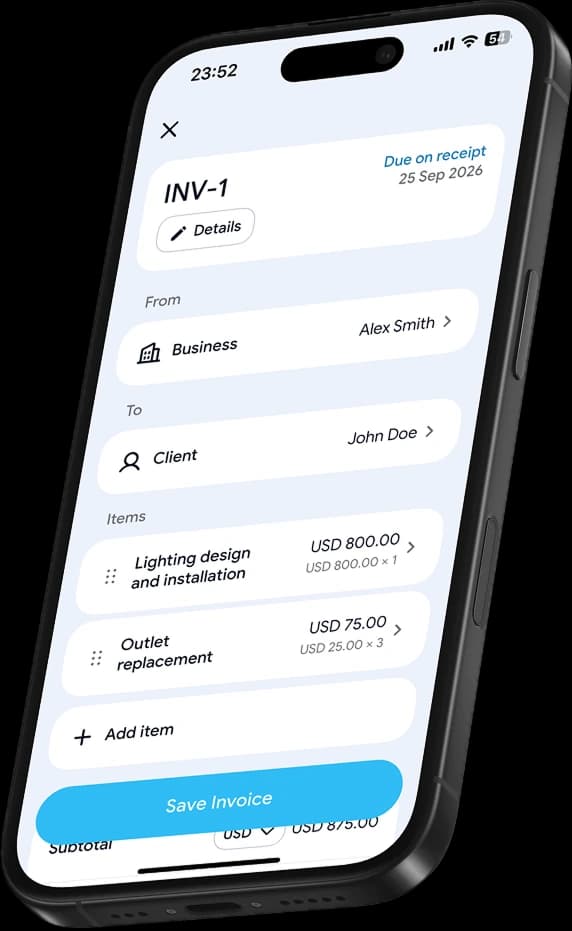
Create, send and manage mechanic invoices right from your phone. Keep your customers, their vehicles and every repair organized — in the garage or out on a call-out.
- Create invoices in seconds
- Download as PDF
- Share with clients
- Works offline
Mechanic Invoice FAQs
How do I create a mechanic invoice?
Use Billby to create professional mechanic invoices directly from your phone. Add your garage and customer details, describe the repairs completed, itemize labor and replacement parts, and set your payment terms. Choose an invoice template and generate a professional PDF invoice ready to send to your customer.
What should a mechanic invoice include?
A mechanic invoice should include your garage details, applicable business registration number, customer information, vehicle details, invoice number, issue date and payment due date. Include an itemized breakdown of repair labor, replacement parts, diagnostic fees, applicable taxes and the total amount due. Add relevant service notes or warranty information where appropriate.
Should mechanics charge separately for labor and parts?
Separating mechanic labor and replacement part costs makes your invoices easier to understand. List the hours worked and hourly rate for each repair, then itemize automotive parts such as brake pads, filters, batteries and spark plugs with their quantities and prices. This provides customers with a clear breakdown of the services performed.
Do mechanics charge tax on labor and replacement parts?
Tax requirements for automotive repair services depend on your location, business tax status and the type of repair performed. Mechanic labor and replacement parts may be subject to different tax rules. Check the applicable requirements with your local tax authority or accountant before setting your invoice tax rate.
When should a mechanic invoice be paid?
Payment terms depend on your agreement with the customer and the type of automotive repair. Some garages request payment when the vehicle is collected, while others offer payment terms such as Net 14 or Net 30 for commercial or fleet customers. Include a clear payment due date, accepted payment methods and any agreed payment conditions on every invoice.
Should a mechanic invoice include vehicle details and warranty information?
Yes. Include relevant vehicle identification details, such as the make, model, registration number and VIN where appropriate. You can also reference repair orders, service records and warranty terms provided to the customer. A mechanic invoice helps document the work completed but does not replace any legally required repair authorization.
Can I create and send mechanic invoices from my phone?
Yes. With the Billby invoice maker app, you can create, customize and send professional mechanic invoices directly from your phone. Save customer details, add repair labor and replacement parts, choose professional invoice templates and manage your invoices whether you’re working in a garage or providing mobile repair services.
Explore more
Templates for other industries
Need an invoice for a different type of work? Browse more professional invoice templates in the Billby app.